creation
How to Turn Workflow Sources into Reusable AI Skills
A practical method for turning workflow templates, automation examples, SOPs, and agent patterns into reusable AI skills for everyday work.
Workflow templates are useful because they show how real work is structured. A good template usually has a trigger, inputs, steps, connected tools, an output, and a point where someone needs to review the result.
That is exactly the raw material for a reusable AI skill.
For an individual or small business owner, the trick is not to copy a complex automation setup. The better move is to extract the useful shape of the workflow, simplify it, and turn it into a skill you can run in ChatGPT, Claude, Gemini, Codex, or your own internal playbook.
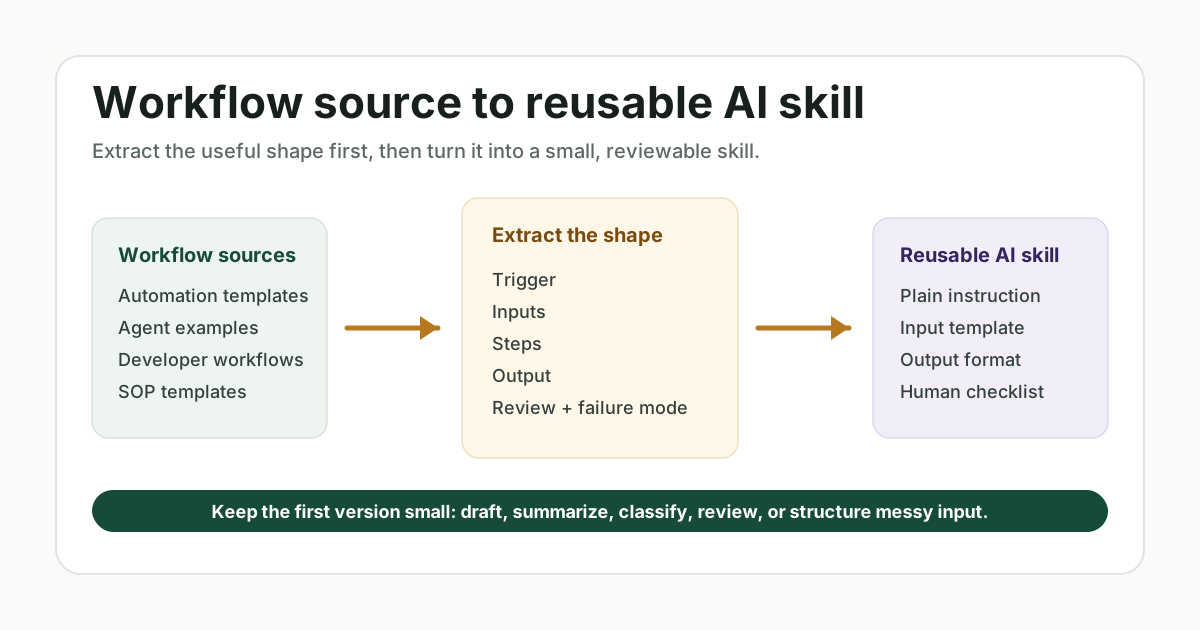
Start with the Source Type
Different workflow sources teach different things.
Automation template libraries such as Zapier, Make, n8n, Airtable, and Notion are useful for finding everyday task patterns: capture a lead, summarize a form response, update a CRM, draft a reply, route a task, or create a content calendar.
Agent workflow examples such as LangGraph, CrewAI, OpenAI Cookbook examples, and AutoGen are useful for understanding more advanced patterns: plan, retrieve, use a tool, review the answer, and hand the result back to a human.
Developer workflow templates such as GitHub Actions are useful because they show mature trigger logic, permissions, testing, deployment, and “do not run this blindly” safety patterns.
Business process templates from Asana, ClickUp, HubSpot, Jira, and Process Street are useful because they show ownership, handoffs, approvals, recurring checklists, and definitions of done.
Review sources such as GitHub issues, community forums, Reddit, and product reviews are useful because they show where people get stuck.
Extract the Workflow Shape
When you find a workflow source, do not start by copying the tool setup. First extract the shape:
- trigger: what starts the workflow
- input: what information is needed
- steps: what happens in order
- output: what should exist at the end
- review point: where a human checks the result
- failure mode: what commonly goes wrong
- reuse case: who would run this again next week
This turns a tool-specific workflow into a portable work pattern.
For example, a CRM automation template might say: when a new lead arrives, enrich the contact, notify sales, and create a follow-up task. The reusable AI skill version might be: turn a lead message into a qualification summary, next-step email, and follow-up checklist.
Convert the Source into a Skill
Use this structure:
Task: [what the workflow helps complete]
Audience: [who uses the output]
Inputs needed: [source material, constraints, tool data, customer context]
Instruction: [what the AI should do and what it must avoid]
Output format: [sections, table, checklist, email, brief, plan]
Review checklist: [facts, risk, tone, missing context, next step]
Fix prompts: [what to ask when the output is weak]
The key is to keep the first version small. If the original workflow has ten app steps, the first AI skill might only handle the thinking step: summarize, classify, draft, review, or turn messy input into a structured brief.
A Practical Example
Source pattern:
- trigger: a customer leaves a review
- input: review text, rating, product or service, date, known issue
- steps: summarize, classify praise and complaint, identify improvement idea, flag urgent issue
- output: review insight summary
- review point: owner checks whether the theme is supported by enough reviews
Reusable AI skill:
You are helping me turn customer reviews into business insights.

Use only the reviews I provide. Group themes by praise, complaint, feature request, confusion, and urgent issue. Do not overstate a theme from one review. Include example evidence, likely business impact, and a recommended next action.

End with a review checklist that asks whether the theme is repeated, whether private details were removed, and whether any public claim needs verification.
This is more useful than asking AI to “analyze reviews” because it carries the workflow’s structure, limits, and review standard.
What to Track for Future Content
If you are building a content library, record each source in a simple tracking note:
source_url:
source_type:
workflow_name:
audience:
trigger:
inputs:
steps:
outputs:
human_review_points:
risk_level:
setup_friction:
user_language:
promptarrow_page_candidate:
claims_to_verify:
This creates a reusable source-material archive. Over time, you can see which workflow types keep appearing: lead follow-up, review analysis, FAQ creation, content planning, customer support, onboarding, reporting, or project handoff.
How This Helps SEO and AI Search
Search engines and AI assistants need clear answers. A workflow-derived skill gives them specific structure:
- what problem the page solves
- who the workflow helps
- what inputs are required
- what output the user gets
- where human review belongs
- what risks or assumptions should be checked
That structure makes the content easier to summarize, cite, compare, and route to the right user.
Common Mistakes
Do not turn every workflow into full automation. Many small businesses need a better draft, a clearer checklist, or a safer review step before they need app-to-app automation.
Do not copy community complaints as facts. Use them to understand friction, missing context, and user language.
Do not ignore setup burden. If the workflow requires API keys, permissions, paid plans, or tool migrations, create a simpler AI skill first.
Do not remove the human review point. The review step is what keeps a reusable skill useful instead of risky.
FAQ
What workflow sources are best for AI skill ideas?
Automation template libraries, SOP templates, agent examples, developer workflow templates, GitHub issues, community forums, and product reviews are all useful. Official templates are best for structure. Community discussion is best for pain points and language.
Should I cite every workflow source in public content?
Use official sources when making factual claims. Use community and review sources for inspiration, objections, and user language. Avoid copying personal examples or treating comments as proof.
What is the easiest workflow to turn into a skill?
Start with a workflow that has clear input and output: customer review to insight summary, meeting notes to action items, lead message to follow-up email, or FAQ questions to answer page.
Practical Takeaway
A workflow source is not just something to copy. It is a pattern to extract. Find the trigger, inputs, steps, output, review point, and failure mode. Then turn that pattern into a small reusable AI skill that a real person can run, check, and improve.
Weekly skill
Get one practical AI skill every week.
Short, useful, and focused on real tasks instead of prompt clutter. Subscriptions are handled by email.